

文档只介绍核心方法,更多内容查看代码的
[WKSDK shared].chatManager 接口在线消息收发
发送消息
基础发送方法
/**
 发送消息 (发送并保存消息)

 @param content 消息正文
 @param channel 投递的频道(个人频道,群频道,客服频道等等)
 */
[[WKSDK shared].chatManager sendMessage:(WKMessageContent*)content channel:(WKChannel*)channel];
发送示例
// 给用户A发送消息hello
WKChannel *channel = [[WKChannel alloc] initWith:@"A" channelType:WK_PERSON];

// 发送给群组 g1
// WKChannel *channel = [[WKChannel alloc] initWith:@"g1" channelType:WK_GROUP];

// 构建一个文本消息对象
WKTextContent *content = [[WKTextContent alloc] initWithContent:@"hello"];

// 发送此文本消息给指定频道
[[WKSDK shared].chatManager sendMessage:content channel:channel];
消息监听
添加监听器
[WKSDK.shared.chatManager addDelegate:self]; // WKChatManagerDelegate
WKChatManagerDelegate 说明
// ------ WKChatManagerDelegate  ------
/**
 收到消息通知
 @param message 收到的消息
 @param left 消息剩余数量 ,可当left为0时再刷新UI,避免频繁刷新UI导致卡顿
 */
- (void)onRecvMessages:(WKMessage*)message left:(NSInteger)left;

/**
 消息更新通知
 @param message 变化的消息
 */
-(void) onMessageUpdate:(WKMessage*) message;

...
消息发送状态码(ReasonCode)
当消息发送后,通过onMessageUpdate: 监听返回的 WKMessage 对象中包含 reasonCode。以下是各状态码的说明:
| 值 | 名称 | 说明 |
|---|---|---|
| 0 | ReasonUnknown | 未知错误 |
| 1 | ReasonSuccess | 成功 |
| 2 | ReasonAuthFail | 认证失败 |
| 3 | ReasonSubscriberNotExist | 订阅者在频道内不存在 |
| 4 | ReasonInBlacklist | 在黑名单列表里 |
| 5 | ReasonChannelNotExist | 频道不存在 |
| 6 | ReasonUserNotOnNode | 用户没在节点上 |
| 7 | ReasonSenderOffline | 发送者离线,消息发送失败 |
| 8 | ReasonMsgKeyError | 消息key错误,消息不合法 |
| 9 | ReasonPayloadDecodeError | payload解码失败 |
| 10 | ReasonForwardSendPacketError | 转发发送包失败 |
| 11 | ReasonNotAllowSend | 不允许发送消息 |
| 12 | ReasonConnectKick | 连接被踢 |
| 13 | ReasonNotInWhitelist | 没在白名单内 |
| 14 | ReasonQueryTokenError | 查询用户token错误 |
| 15 | ReasonSystemError | 系统错误 |
| 16 | ReasonChannelIDError | 错误的频道ID |
| 17 | ReasonNodeMatchError | 节点匹配错误 |
| 18 | ReasonNodeNotMatch | 节点不匹配 |
| 19 | ReasonBan | 频道被封禁 |
| 20 | ReasonNotSupportHeader | 不支持的header |
| 21 | ReasonClientKeyIsEmpty | clientKey 是空的 |
| 22 | ReasonRateLimit | 速率限制 |
| 23 | ReasonNotSupportChannelType | 不支持的频道类型 |
| 24 | ReasonDisband | 频道已解散 |
| 25 | ReasonSendBan | 发送被封禁 |
常用消息类型
SDK内置了一些常用的消息类型,比如文本消息、图片消息、语音消息。文本消息
@interface WKTextContent : WKMessageContent

- (instancetype)initWithContent:(NSString*)content;

@property(nonatomic,copy) NSString *content; // 消息内容

@property(nonatomic,copy,nullable) NSString *format; // 内容格式 默认为普通文本 html,markdown

@end
使用示例
// 创建文本消息
WKTextContent *textContent = [[WKTextContent alloc] initWithContent:@"Hello World"];

// 设置格式(可选)
textContent.format = @"markdown"; // 支持 html, markdown

// 发送消息
WKChannel *channel = [[WKChannel alloc] initWith:@"user123" channelType:WK_PERSON];
[[WKSDK shared].chatManager sendMessage:textContent channel:channel];
图片消息
@interface WKImageContent : WKMediaMessageContent

@property(nonatomic,assign) CGFloat width; // 图片宽度
@property(nonatomic,assign) CGFloat height; // 图片高度

/*!
 初始化图片消息
 @param image   原始图片
 @return        图片消息对象
 */
- (instancetype)initWithImage:(UIImage *)image;

/// 通过data初始化
/// @param data 图片数据
/// @param width 图片宽度
/// @param height 图片高度
- (instancetype)initWithData:(NSData *)data width:(CGFloat)width height:(CGFloat)height;

/// 初始化
/// @param data 原图data
/// @param width 原图宽度
/// @param height 原图高度
/// @param thumbData 缩略图data (如果传了缩略图的data数据,sdk将不再生成缩略图数据)
- (instancetype)initWithData:(NSData *)data width:(CGFloat)width height:(CGFloat)height thumbData:(nullable NSData*)thumbData;

/*!
 是否发送原图
 @discussion 在发送图片的时候,是否发送原图,默认值为NO。
 */
@property (nonatomic, getter=isFull) BOOL full;

@end
语音消息
@interface WKVoiceContent : WKMediaMessageContent

/**
 初始化
 @param voiceData 音频数据
 @param second 音频秒长
 @param waveform  音频波浪数据 (可选参数)
 @return 语音消息对象
 */
- (instancetype)initWithData:(NSData *)voiceData second:(int)second waveform:(NSData*)waveform;

// 音频数据
@property(nonatomic,strong) NSData *voiceData;

// 音频长度(单位秒)
@property(nonatomic,assign) NSInteger second;

// 音频波浪数据 (可选参数)
@property(nonatomic,strong) NSData *waveform;

@end
自定义消息
查看自定义消息消息扩展
一些消息可能需要携带一些额外的信息,比如消息已读状态、消息是否被编辑过等等,这些信息可以通过消息的扩展属性来实现。更新扩展
WKMessage类里有个remoteExtra 属性,当修改这个属性后,需要调用此方法来更新远程扩展:
[[WKSDK shared].chatManager updateMessageRemoteExtra:(WKMessage*)message];
同步扩展
增量同步指定频道的所有消息扩展数据(此方法一般点开聊天页面的时候调用一次):// channel 需要同步的频道
[[WKSDK shared].chatManager syncMessageExtra:(WKChannel*)channel
complete:(void(^_Nullable)(NSError * _Nullable error))complete];
扩展数据源
更新扩展数据源
触发时机:调用[[WKSDK shared].chatManager updateMessageRemoteExtra] 的时候触发
// newExtra 新的扩展数据
// oldExtra 旧的扩展数据
[[[WKSDK shared] chatManager] setUpdateMessageExtraProvider:^(WKMessageExtra *newExtra,WKMessageExtra *oldExtra,WKUpdateMessageExtraCallback callback) {

}];
同步扩展数据源
触发时机:调用[[WKSDK shared].chatManager syncMessageExtra] 的时候触发
// channel 同步扩展消息的频道
// extraVersion 当前客户端存在的数据版本
// limit 每次同步数据量
// callback 当请求服务器获取到消息后,应调用此回调 (注意: 不管请求失败与否都需要调用callback)
[[[WKSDK shared] chatManager] setSyncMessageExtraProvider:^(WKChannel * _Nonnull channel, long long extraVersion,NSInteger limit, WKSyncMessageExtraCallback  _Nonnull callback) {

}];
历史消息
查询最新消息
查询某个频道最新的消息(一般是第一次进入会话页面查询首屏消息时调用此方法):/**
查询某个频道最新的消息
@param channel 频道
@param limit 消息数量限制
@param complete 查询回调
*/
[[WKSDK shared].chatManager pullLastMessages:(WKChannel*)channel
limit:(int)limit
complete:(void(^)(NSArray<WKMessage*> *messages, NSError *error))complete];
下拉加载消息
/**
 下拉加载消息
 @param channel 频道
 @param startOrderSeq 起始的orderSeq 比如需要查询 100以上的10条消息 那么startOrderSeq就是100 查询出来的数据为 90 91 92 93 94 95 96 97 98 99
 @param limit 消息数量限制
 @param complete 查询回调
 */
[[WKSDK shared].chatManager pullDown:(WKChannel*)channel
                        startOrderSeq:(uint32_t)startOrderSeq
                                limit:(int)limit
                             complete:(void(^)(NSArray<WKMessage*> *messages, NSError *error))complete];
上拉加载消息
/**
 上拉加载消息
 @param startOrderSeq 起始的orderSeq 比如需要查询 100以下的10条消息 那么startOrderSeq就是100 查询出来的数据为 101 102 103 104 105 106 107 108 109 110
 @param limit 消息数量限制
 @param complete 查询回调
 */
[[WKSDK shared].chatManager pullUp:(WKChannel*)channel
                      startOrderSeq:(uint32_t)startOrderSeq
                              limit:(int)limit
                           complete:(void(^)(NSArray<WKMessage*> *messages, NSError *error))complete];
查询周围消息
/**
 查询指定orderSeq周围的消息 上5条下5条,比如 orderSeq 为 20 则查询 16 17 18 19 20 21 22 23 24 25 主要使用在定位消息
 @param channel 频道
 @param orderSeq 以此OrderSeq查询周围的消息
 */
[[WKSDK shared].chatManager pullAround:(WKChannel*)channel
                               orderSeq:(uint32_t)orderSeq
                                  limit:(int)limit
                               complete:(void(^)(NSArray<WKMessage*> *messages, NSError *error))complete];
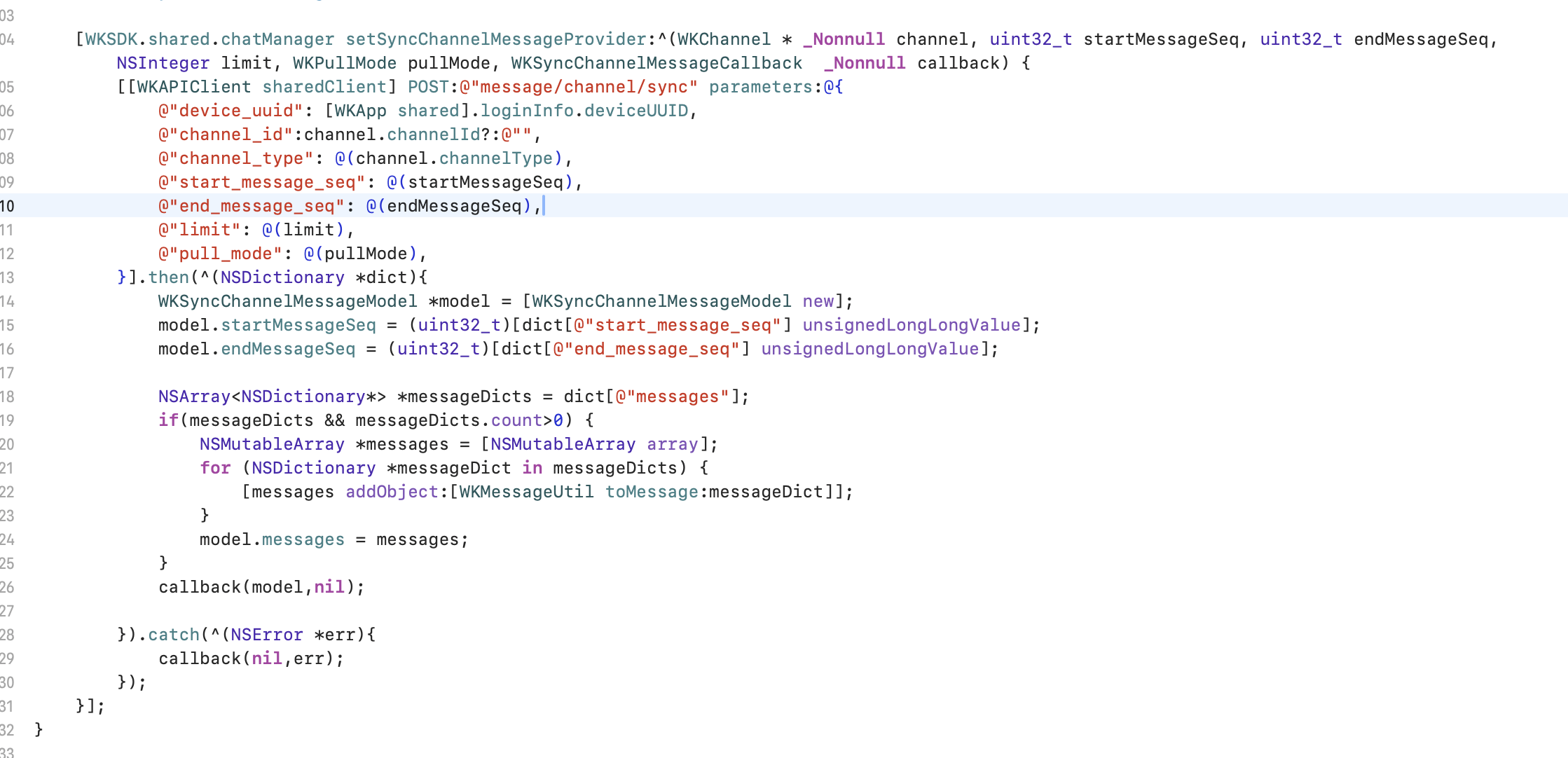
历史消息数据源
触发时机:获取历史消息并且本地没有此消息时,SDK会调用此方法来补全本地消息
同步频道消息,当操作请求历史消息的时候,SDK会判断本地是否有消息,如果没有或者缺失,SDK会调用此方法来请求服务器的消息
// channel 同步消息的频道
// startMessageSeq 开始消息序号
// endMessageSeq 结束消息序号
// limit 消息每次同步数量
// pullMode 拉取消息模式 0:向下拉取 1:向上拉取
// callback 当请求服务器获取到消息后,应调用此回调 (注意: 不管请求失败与否都需要调用callback)
[WKSDK.shared.chatManager setSyncChannelMessageProvider:^(WKChannel * _Nonnull channel, uint32_t startMessageSeq, uint32_t endMessageSeq, NSInteger limit, WKPullMode pullMode, WKSyncChannelMessageCallback  _Nonnull callback) {

}]
类属性说明
消息类核心属性@interface WKMessage : NSObject
@property(nonatomic,strong) WKMessageHeader *header; // 消息头
@property(nonatomic,strong) WKSetting *setting; // 消息设置
@property(nonatomic,strong) WKChannel *channel; // 聊天频道
@property(nonatomic,copy) NSString *fromUid; // 发送者uid
@property(nonatomic,strong) WKMessageContent *content; // 消息正文
@property(nonatomic,assign) NSInteger timestamp; // 消息时间(服务器时间,单位秒)
@property(nonatomic,strong) NSMutableDictionary *extra; // 消息本地扩展数据
@property(nonatomic,strong) WKMessageExtra *remoteExtra; // 消息远程扩展
...
@interface WKMessageContent : NSObject<NSCopying>

/**
 你自定义的消息类型,在各个平台上需要保持一致
 @return 正文类型
 */

- (NSNumber*) contentType;

// 上层无需实现encode 实现此方法即可
- (NSDictionary*) encodeWithJSON;

// 上层无序实现decode 实现此方法即可
- (void) decodeWithJSON:(NSDictionary*)contentDic;

// 消息中的@提醒信息
@property (nonatomic, strong) WKMentionedInfo *mentionedInfo;


/// 回复内容
@property(nonatomic,strong) WKReply *reply;

...
下一步
频道管理
学习如何管理频道和群组
会话管理
处理会话列表和未读消息
多媒体消息
处理图片、语音、视频等多媒体消息
高级功能
自定义消息和高级配置