> ## Documentation Index
> Fetch the complete documentation index at: https://wukong.mintlify.site/llms.txt
> Use this file to discover all available pages before exploring further.
# 插件开发
> 学习如何开发 WuKongIM 插件,扩展和增强消息处理功能
## 概述
WuKongIM 定义了一套插件规则,第三方开发者可以实现这套规则来扩展或增强现有 WuKongIM 的消息处理逻辑。通过插件可以实现敏感词过滤、消息搜索、AI 聊天等功能。
插件功能在 WuKongIM 2.1.3 或以上版本才支持
## 插件类型
### 用户插件
用户插件可以收到插件绑定用户的所有消息,安装后需要绑定用户才能生效。
**特点**:
* 只处理绑定用户的消息
* 适用于 AI 聊天、个人助手等场景
* 实现 `Receive` 函数
**使用场景**:
* 与大模型聊天:绑定指定用户 UID,给此用户发消息即给大模型发消息
* 个人助手:为特定用户提供定制化服务
### 全局插件
全局插件可以收到系统内的所有消息,安装后全局都会生效。
**特点**:
* 监听系统所有消息
* 无需绑定用户
* 适用于系统级功能
**使用场景**:
* 敏感词过滤:监听每条发送消息进行过滤
* 消息搜索:对所有消息建立搜索索引
* 数据分析:统计和分析消息数据
## 开发环境搭建
### 前置要求
* Go 语言环境(目前插件开发只支持 Go 语言)
* WuKongIM 源码或运行实例
* [Go PDK](https://github.com/WuKongIM/go-pdk) 插件开发库
### 环境准备
**1. 下载 WuKongIM 源码**
```bash theme={null}
git clone https://github.com/WuKongIM/WuKongIM.git
cd WuKongIM
```
**2. 启动单机 WuKongIM**
```bash theme={null}
go run main.go --config exampleconfig/single.yaml
```
**3. 创建插件项目**
```bash theme={null}
mkdir my-plugin
cd my-plugin
go mod init my-plugin
go get github.com/WuKongIM/go-pdk
```
## 插件开发
### 基础结构
以下是一个完整的插件开发示例:
```go 插件结构定义 theme={null}
package main
import (
"encoding/json"
"fmt"
"github.com/WuKongIM/go-pdk"
)
// 定义插件的配置结构体
type Config struct {
Name string `json:"name" label:"AI名字"` // json为配置项名称,label为WuKongIM后台显示的配置项名称
}
// 插件结构体
type AIExample struct {
Config Config // 插件的配置,名字必须为Config
}
// 创建一个插件对象
func New() interface{} {
return &AIExample{}
}
```
```go 插件函数实现 theme={null}
// 收到消息时调用(用户插件)
func (a *AIExample) Receive(c *pdk.Context) {
// 获取发送消息内容
text := a.getText(c)
// 编码消息
data, _ := json.Marshal(map[string]interface{}{
"type": 1,
"content": fmt.Sprintf("我是%s,收到您的消息:%s", a.Config.Name, text),
})
// 回复消息
c.Reply(data)
}
// 辅助函数:获取消息文本内容
func (a *AIExample) getText(c *pdk.Context) string {
var payload map[string]interface{}
json.Unmarshal(c.GetPayload(), &payload)
if content, ok := payload["content"].(string); ok {
return content
}
return ""
}
```
```go 启动插件 theme={null}
func main() {
pdk.RunServer(New, "wk.plugin.ai-example",
pdk.WithVersion("0.0.1"),
pdk.WithPriority(1))
}
```
### 配置说明
**Config 结构体**:
* 名字必须为 `Config`
* 声明后可在 WuKongIM 后台配置
* 使用 `json` 标签定义配置项名称
* 使用 `label` 标签定义后台显示名称
**插件启动参数**:
* 第一个参数:插件构造函数
* 第二个参数:插件唯一标识符
* `WithVersion`:插件版本号
* `WithPriority`:插件优先级
## 插件生命周期
### 核心函数
**调用时机**:插件启动时调用
**用途**:初始化插件资源、建立数据库连接等
```go theme={null}
func (a *AIExample) Setup() {
// 插件初始化逻辑
fmt.Println("插件启动")
}
```
**调用时机**:收到给插件发送的消息时调用
**作用范围**:只作用于绑定的用户
**用途**:处理用户消息,实现 AI 对话等功能
```go theme={null}
func (a *AIExample) Receive(c *pdk.Context) {
// 处理用户消息
text := a.getText(c)
// 生成回复并发送
c.Reply(responseData)
}
```
**调用时机**:消息发送前调用
**作用范围**:全局函数
**用途**:修改消息内容、敏感词过滤等
```go theme={null}
func (a *AIExample) Send(c *pdk.Context) {
// 在消息发送前进行处理
// 可以修改消息内容或阻止发送
}
```
**调用时机**:消息存储后在扩散前调用
**作用范围**:全局函数
**用途**:数据分析、消息搜索索引建立等
```go theme={null}
func (a *AIExample) PersistAfter(c *pdk.Context) {
// 消息已存储,可进行数据分析
// 建立搜索索引等
}
```
**调用时机**:插件启动时注册路由
**用途**:定义插件的 HTTP 接口
```go theme={null}
func (a *AIExample) Route(c *pdk.Route) {
// http://127.0.0.1:5001/plugins/[插件编号]/hello
c.GET("/hello", a.sayHello)
c.POST("/config", a.updateConfig)
}
func (a *AIExample) sayHello(c *pdk.Context) {
c.JSON(200, map[string]string{"message": "Hello from plugin"})
}
```
**调用时机**:配置发生变化时调用
**用途**:响应配置更新,重新加载配置等
```go theme={null}
func (a *AIExample) ConfigUpdate() {
// 配置更新处理逻辑
fmt.Printf("配置已更新: %+v\n", a.Config)
}
```
**调用时机**:插件停止时调用
**用途**:清理资源、关闭连接等
```go theme={null}
func (a *AIExample) Stop() {
// 清理资源
fmt.Println("插件停止")
}
```
## 调试和测试
### 本地调试
**1. 启动 WuKongIM**
```bash theme={null}
cd WuKongIM
go run main.go --config exampleconfig/single.yaml
```
**2. 启动插件**
```bash theme={null}
cd my-plugin
go run main.go
```
**3. 验证连接**
插件启动后,如果出现以下日志说明与 WuKongIM 建立连接成功:
 ### 用户插件测试
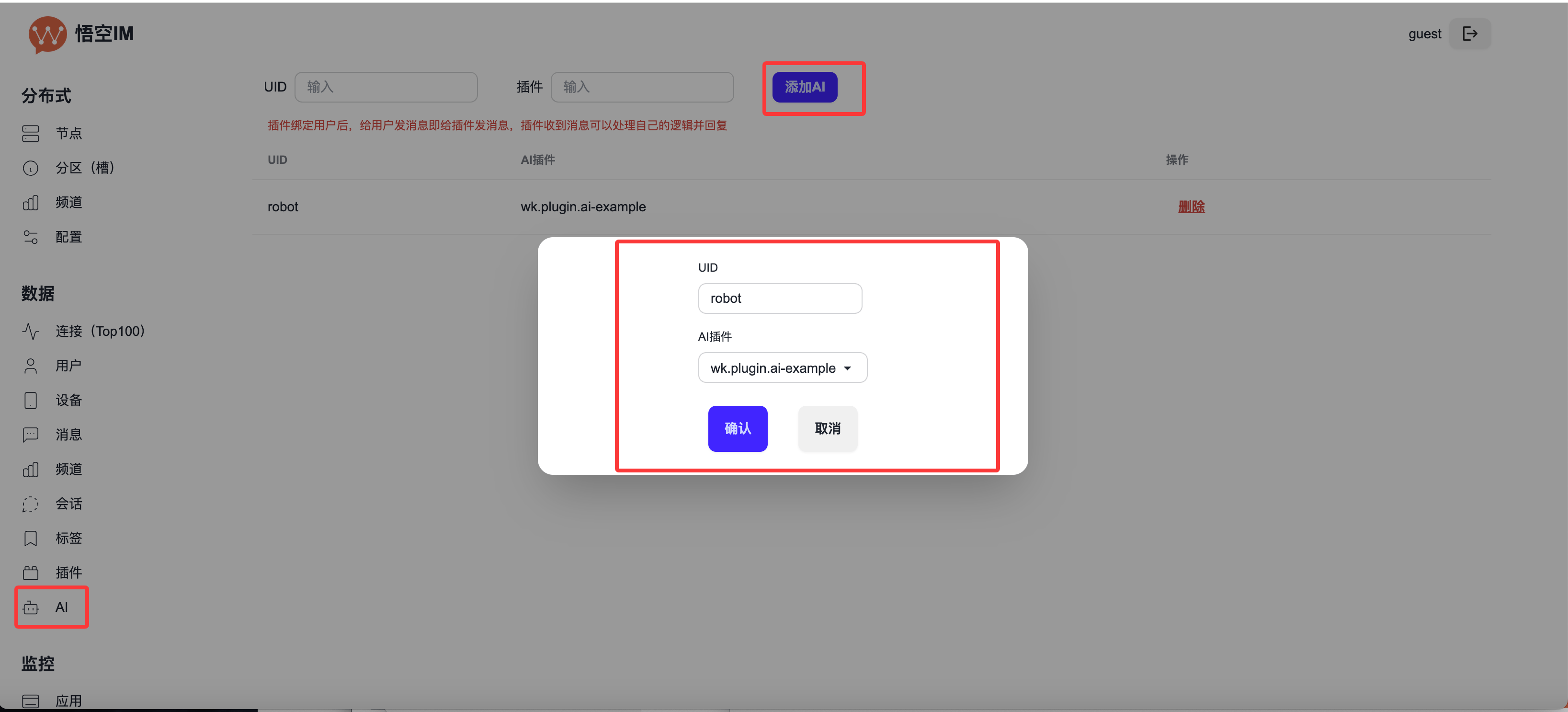
**1. 绑定用户**
在 WuKongIM 后台 → AI → 添加 AI,将插件绑定到指定用户:
### 用户插件测试
**1. 绑定用户**
在 WuKongIM 后台 → AI → 添加 AI,将插件绑定到指定用户:
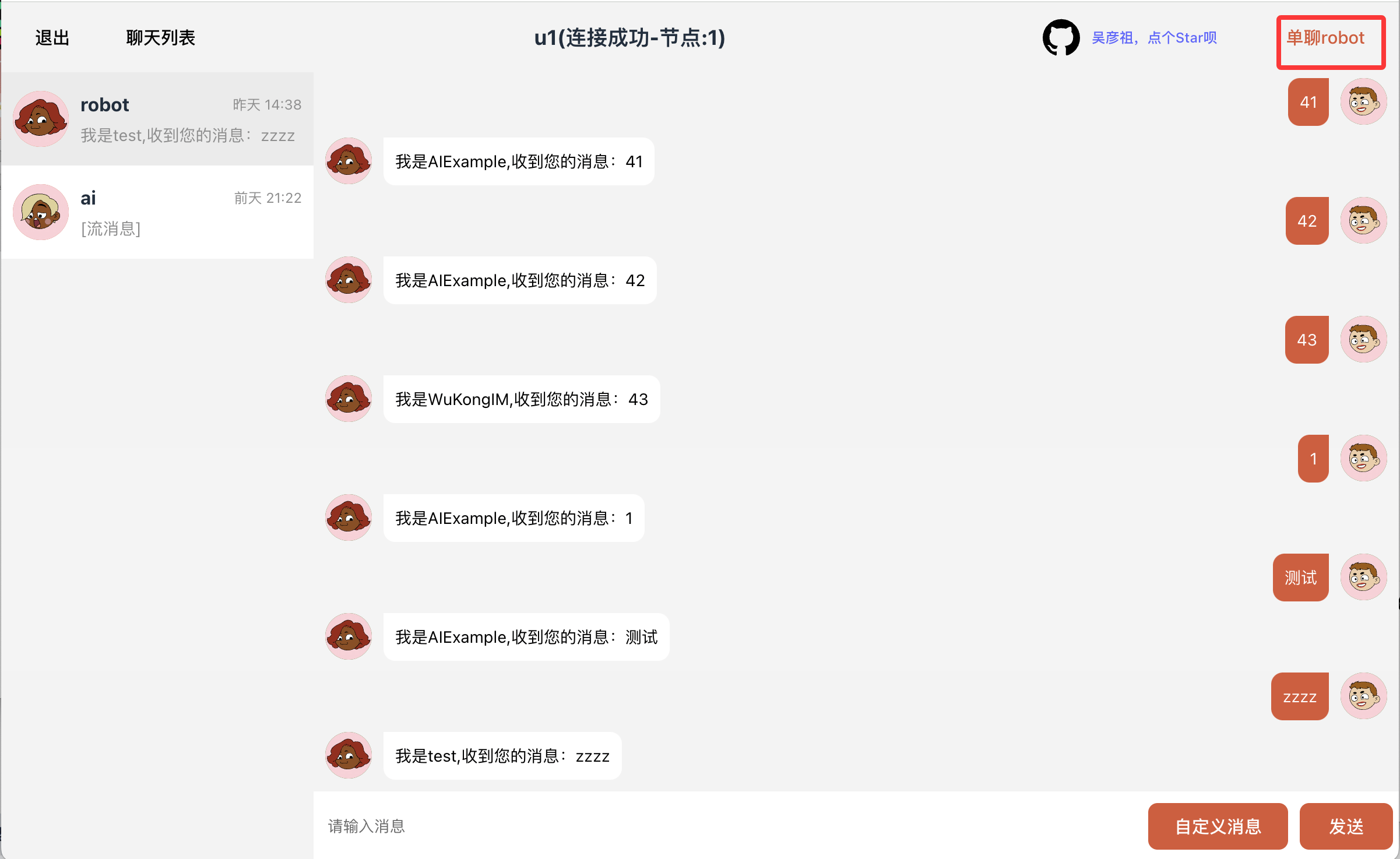
 **2. 发送测试消息**
给绑定的用户发送消息即可调试插件的 `Receive` 方法:
**2. 发送测试消息**
给绑定的用户发送消息即可调试插件的 `Receive` 方法:
 ### 全局插件测试
全局插件无需绑定用户,当系统中有消息发送时,插件就会被调用。
## 开发示例
### AI 聊天插件
```go 完整示例 theme={null}
package main
import (
"encoding/json"
"fmt"
"strings"
"github.com/WuKongIM/go-pdk"
)
type Config struct {
Name string `json:"name" label:"AI名字"`
ApiKey string `json:"api_key" label:"API密钥"`
}
type AIPlugin struct {
Config Config
}
func New() interface{} {
return &AIPlugin{}
}
func (a *AIPlugin) Setup() {
fmt.Printf("AI插件 %s 启动成功\n", a.Config.Name)
}
func (a *AIPlugin) Receive(c *pdk.Context) {
text := a.getText(c)
// 调用AI服务获取回复
reply := a.getAIReply(text)
// 构造回复消息
data, _ := json.Marshal(map[string]interface{}{
"type": 1,
"content": reply,
})
c.Reply(data)
}
func (a *AIPlugin) getText(c *pdk.Context) string {
var payload map[string]interface{}
json.Unmarshal(c.GetPayload(), &payload)
if content, ok := payload["content"].(string); ok {
return content
}
return ""
}
func (a *AIPlugin) getAIReply(text string) string {
// 这里可以调用实际的AI服务
// 示例:简单的回复逻辑
if strings.Contains(text, "你好") {
return fmt.Sprintf("你好!我是%s,很高兴为您服务!", a.Config.Name)
}
return fmt.Sprintf("我是%s,收到您的消息:%s", a.Config.Name, text)
}
func (a *AIPlugin) Route(c *pdk.Route) {
c.GET("/status", a.getStatus)
}
func (a *AIPlugin) getStatus(c *pdk.Context) {
c.JSON(200, map[string]interface{}{
"name": a.Config.Name,
"status": "running",
})
}
func (a *AIPlugin) ConfigUpdate() {
fmt.Printf("配置已更新: %+v\n", a.Config)
}
func (a *AIPlugin) Stop() {
fmt.Printf("AI插件 %s 停止\n", a.Config.Name)
}
func main() {
pdk.RunServer(New, "wk.plugin.ai-chat",
pdk.WithVersion("1.0.0"),
pdk.WithPriority(1))
}
```
```go 敏感词过滤插件 theme={null}
package main
import (
"encoding/json"
"strings"
"github.com/WuKongIM/go-pdk"
)
type Config struct {
Words []string `json:"words" label:"敏感词列表"`
}
type FilterPlugin struct {
Config Config
}
func New() interface{} {
return &FilterPlugin{}
}
func (f *FilterPlugin) Send(c *pdk.Context) {
var payload map[string]interface{}
json.Unmarshal(c.GetPayload(), &payload)
if content, ok := payload["content"].(string); ok {
// 检查敏感词
filtered := f.filterContent(content)
if filtered != content {
payload["content"] = filtered
newPayload, _ := json.Marshal(payload)
c.SetPayload(newPayload)
}
}
}
func (f *FilterPlugin) filterContent(content string) string {
for _, word := range f.Config.Words {
if strings.Contains(content, word) {
content = strings.ReplaceAll(content, word, "***")
}
}
return content
}
func main() {
pdk.RunServer(New, "wk.plugin.filter",
pdk.WithVersion("1.0.0"),
pdk.WithPriority(10))
}
```
## 插件安装和使用
### 安装插件
**1. 从插件市场下载**
* [Github 插件市场](https://github.com/WuKongIM/plugins/releases/latest)
* [Gitee 插件市场](https://gitee.com/WuKongDev/plugins/releases/latest)
插件格式:`[插件名字]-[系统]-[CPU架构].wkp`
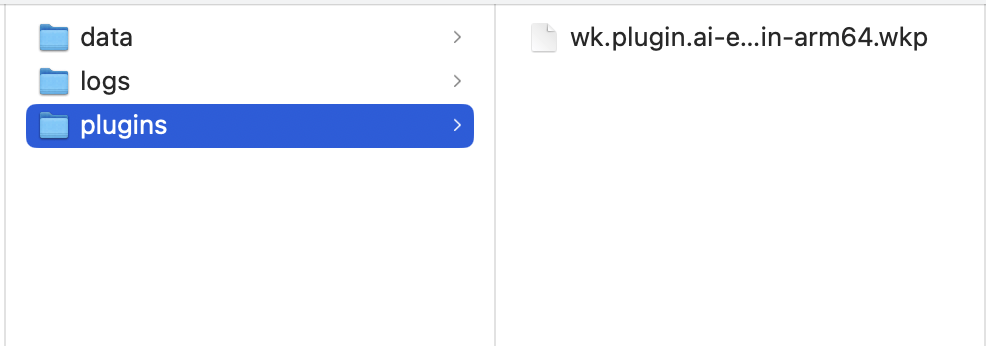
**2. 安装到 WuKongIM**
将插件复制到 WuKongIM 数据目录下的 `plugins` 目录:
### 全局插件测试
全局插件无需绑定用户,当系统中有消息发送时,插件就会被调用。
## 开发示例
### AI 聊天插件
```go 完整示例 theme={null}
package main
import (
"encoding/json"
"fmt"
"strings"
"github.com/WuKongIM/go-pdk"
)
type Config struct {
Name string `json:"name" label:"AI名字"`
ApiKey string `json:"api_key" label:"API密钥"`
}
type AIPlugin struct {
Config Config
}
func New() interface{} {
return &AIPlugin{}
}
func (a *AIPlugin) Setup() {
fmt.Printf("AI插件 %s 启动成功\n", a.Config.Name)
}
func (a *AIPlugin) Receive(c *pdk.Context) {
text := a.getText(c)
// 调用AI服务获取回复
reply := a.getAIReply(text)
// 构造回复消息
data, _ := json.Marshal(map[string]interface{}{
"type": 1,
"content": reply,
})
c.Reply(data)
}
func (a *AIPlugin) getText(c *pdk.Context) string {
var payload map[string]interface{}
json.Unmarshal(c.GetPayload(), &payload)
if content, ok := payload["content"].(string); ok {
return content
}
return ""
}
func (a *AIPlugin) getAIReply(text string) string {
// 这里可以调用实际的AI服务
// 示例:简单的回复逻辑
if strings.Contains(text, "你好") {
return fmt.Sprintf("你好!我是%s,很高兴为您服务!", a.Config.Name)
}
return fmt.Sprintf("我是%s,收到您的消息:%s", a.Config.Name, text)
}
func (a *AIPlugin) Route(c *pdk.Route) {
c.GET("/status", a.getStatus)
}
func (a *AIPlugin) getStatus(c *pdk.Context) {
c.JSON(200, map[string]interface{}{
"name": a.Config.Name,
"status": "running",
})
}
func (a *AIPlugin) ConfigUpdate() {
fmt.Printf("配置已更新: %+v\n", a.Config)
}
func (a *AIPlugin) Stop() {
fmt.Printf("AI插件 %s 停止\n", a.Config.Name)
}
func main() {
pdk.RunServer(New, "wk.plugin.ai-chat",
pdk.WithVersion("1.0.0"),
pdk.WithPriority(1))
}
```
```go 敏感词过滤插件 theme={null}
package main
import (
"encoding/json"
"strings"
"github.com/WuKongIM/go-pdk"
)
type Config struct {
Words []string `json:"words" label:"敏感词列表"`
}
type FilterPlugin struct {
Config Config
}
func New() interface{} {
return &FilterPlugin{}
}
func (f *FilterPlugin) Send(c *pdk.Context) {
var payload map[string]interface{}
json.Unmarshal(c.GetPayload(), &payload)
if content, ok := payload["content"].(string); ok {
// 检查敏感词
filtered := f.filterContent(content)
if filtered != content {
payload["content"] = filtered
newPayload, _ := json.Marshal(payload)
c.SetPayload(newPayload)
}
}
}
func (f *FilterPlugin) filterContent(content string) string {
for _, word := range f.Config.Words {
if strings.Contains(content, word) {
content = strings.ReplaceAll(content, word, "***")
}
}
return content
}
func main() {
pdk.RunServer(New, "wk.plugin.filter",
pdk.WithVersion("1.0.0"),
pdk.WithPriority(10))
}
```
## 插件安装和使用
### 安装插件
**1. 从插件市场下载**
* [Github 插件市场](https://github.com/WuKongIM/plugins/releases/latest)
* [Gitee 插件市场](https://gitee.com/WuKongDev/plugins/releases/latest)
插件格式:`[插件名字]-[系统]-[CPU架构].wkp`
**2. 安装到 WuKongIM**
将插件复制到 WuKongIM 数据目录下的 `plugins` 目录:
 如果日志提示 permission denied,执行 `sudo chmod +x 插件名字` 来设置权限
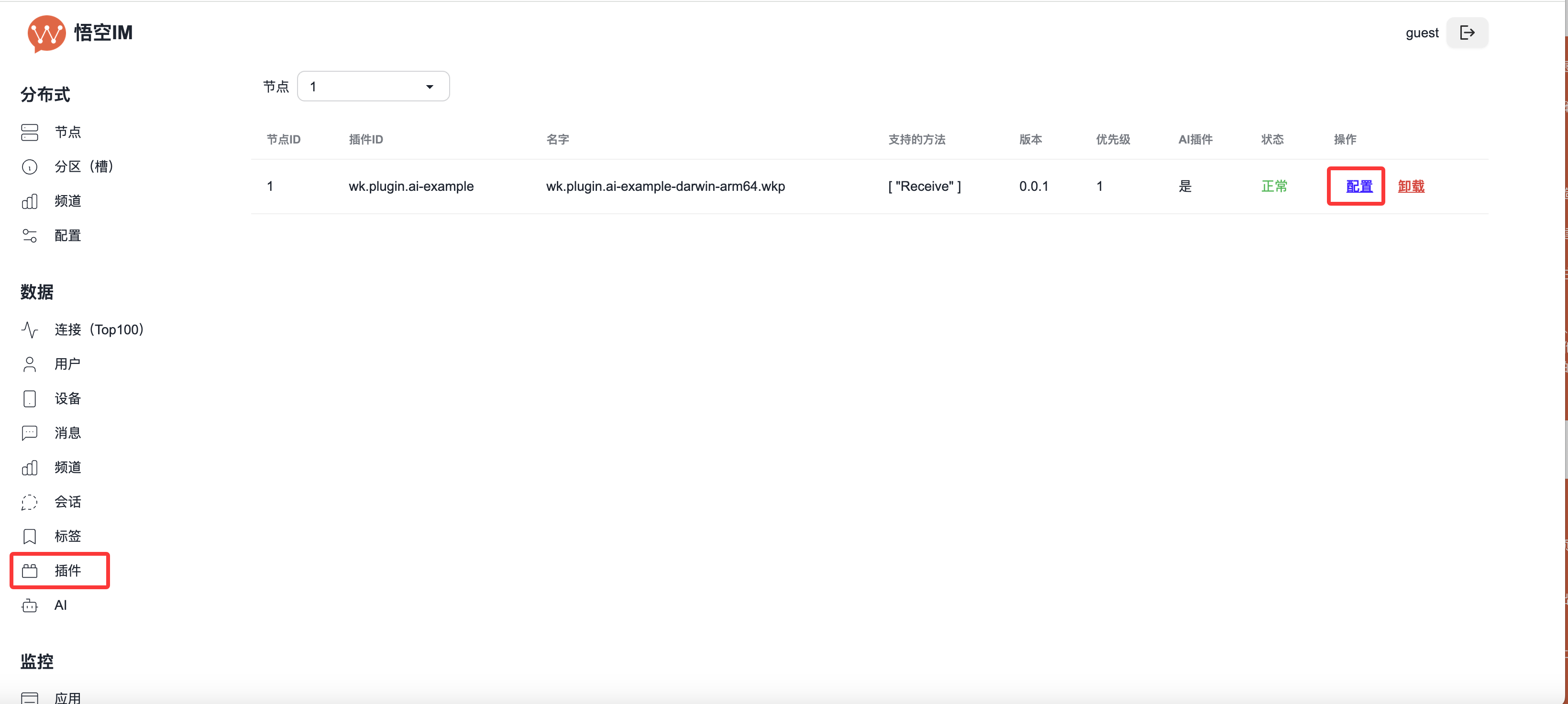
### 配置插件
如果插件需要配置,在 WuKongIM 管理后台的插件列表中点击配置按钮:
如果日志提示 permission denied,执行 `sudo chmod +x 插件名字` 来设置权限
### 配置插件
如果插件需要配置,在 WuKongIM 管理后台的插件列表中点击配置按钮:
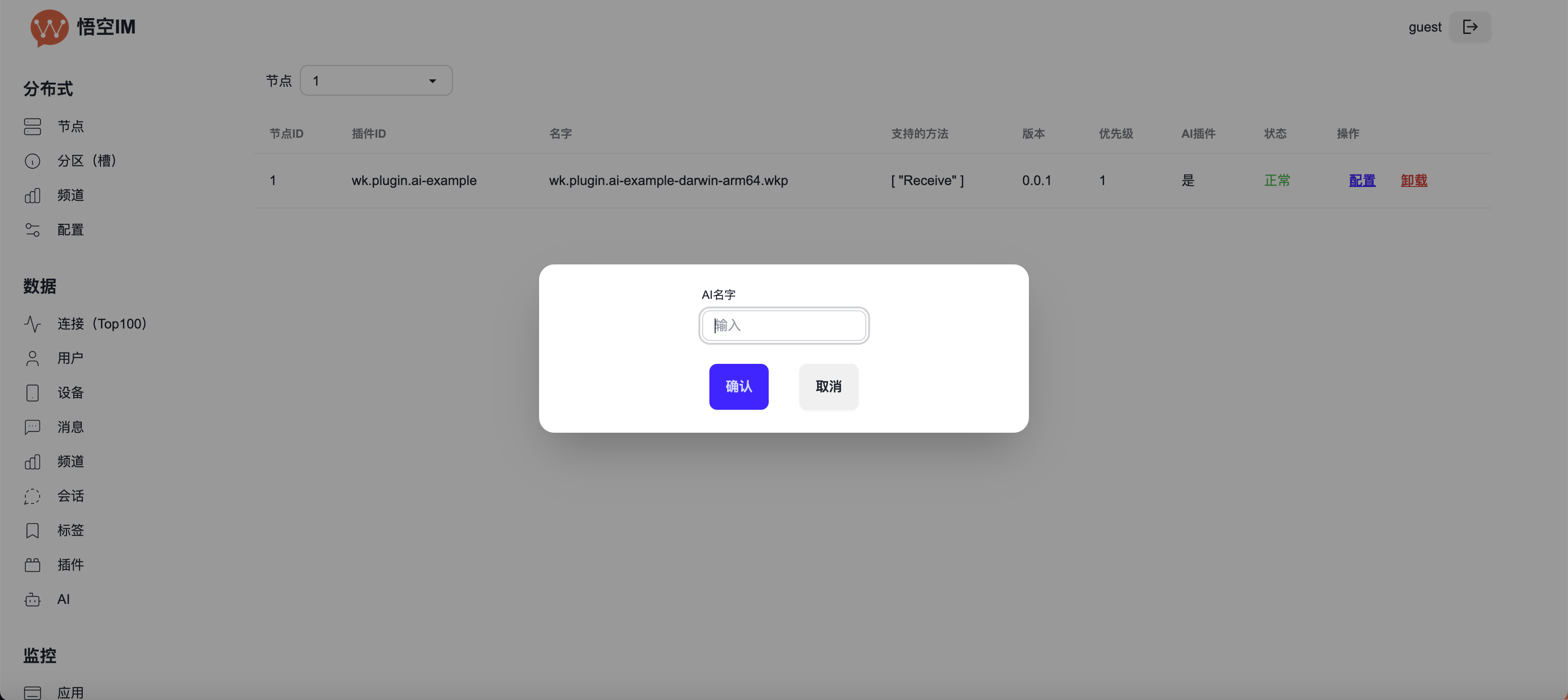 guest 用户没有权限配置插件,需要管理员权限
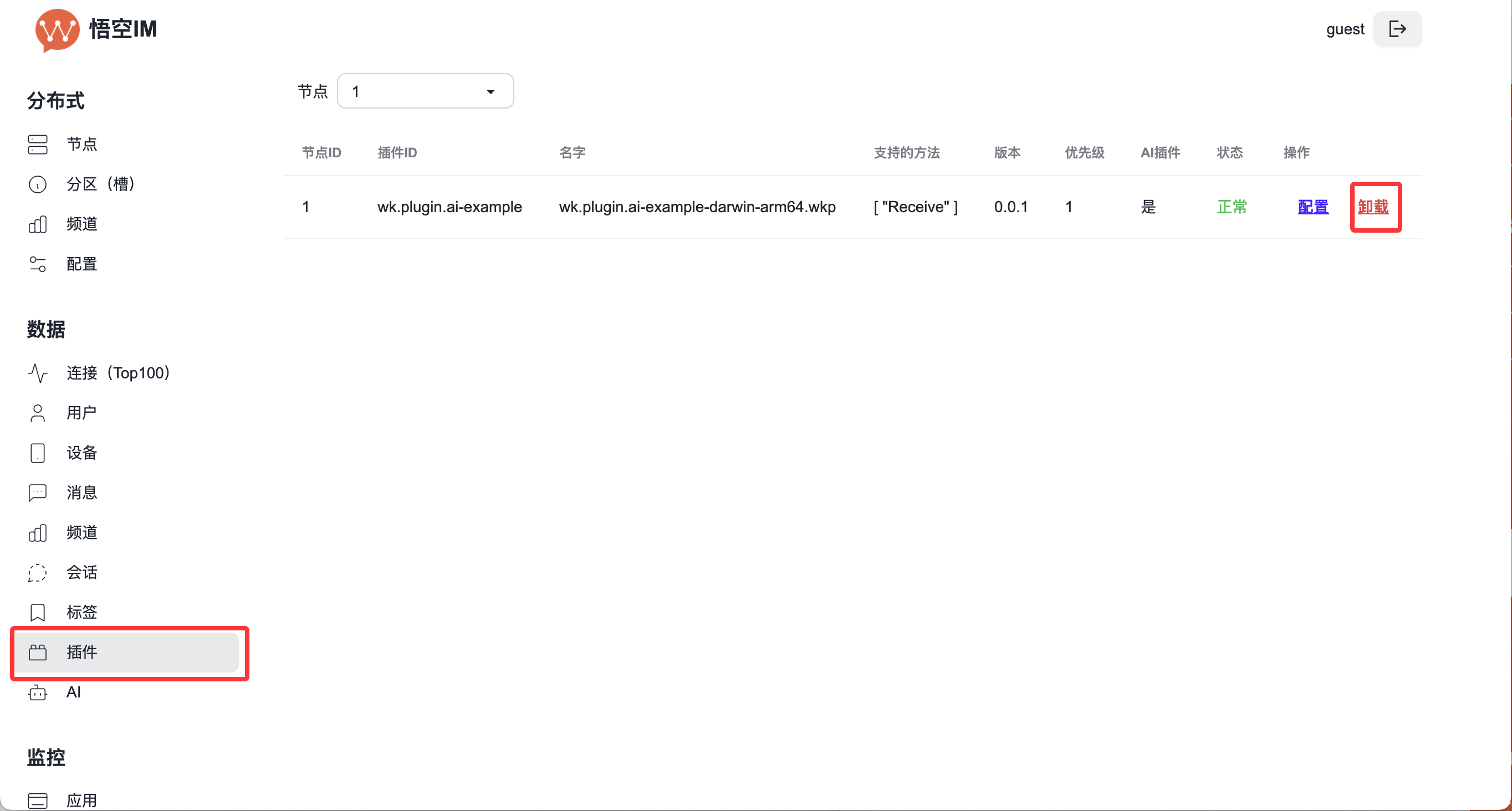
### 卸载插件
在 WuKongIM 后台 → 插件 → 卸载:
guest 用户没有权限配置插件,需要管理员权限
### 卸载插件
在 WuKongIM 后台 → 插件 → 卸载:
 ## 打包和部署
### 构建插件
```bash theme={null}
# 构建 Linux amd64 版本
GOOS=linux GOARCH=amd64 go build -o my-plugin-linux-amd64
# 构建 macOS amd64 版本
GOOS=darwin GOARCH=amd64 go build -o my-plugin-darwin-amd64
# 构建 Windows amd64 版本
GOOS=windows GOARCH=amd64 go build -o my-plugin-windows-amd64.exe
```
### 打包为 .wkp 文件
```bash theme={null}
# 重命名为 .wkp 格式
mv my-plugin-linux-amd64 my-plugin-linux-amd64.wkp
```
### 部署到生产环境
1. 将 `.wkp` 文件上传到服务器
2. 复制到 WuKongIM 的 `plugins` 目录
3. 重启 WuKongIM 或在后台启用插件
4. 在管理后台进行配置
## 最佳实践
### 开发建议
1. **错误处理**:妥善处理各种异常情况
2. **性能优化**:避免阻塞操作,使用异步处理
3. **资源管理**:及时释放资源,避免内存泄漏
4. **日志记录**:添加适当的日志便于调试
5. **配置验证**:验证配置参数的有效性
### 安全考虑
1. **输入验证**:对所有输入进行严格验证
2. **权限控制**:确保插件只访问必要的资源
3. **敏感信息**:妥善保护 API 密钥等敏感配置
4. **网络安全**:使用 HTTPS 进行外部 API 调用
### 性能优化
1. **缓存机制**:对频繁访问的数据进行缓存
2. **批量处理**:合并多个操作减少开销
3. **异步处理**:使用 goroutine 处理耗时操作
4. **连接池**:复用数据库和网络连接
## 相关资源
* [Go PDK 文档](https://github.com/WuKongIM/go-pdk)
* [插件示例代码](https://github.com/WuKongIM/plugins)
* [WuKongIM 源码](https://github.com/WuKongIM/WuKongIM)
* [插件市场](https://github.com/WuKongIM/plugins/releases/latest)
## 打包和部署
### 构建插件
```bash theme={null}
# 构建 Linux amd64 版本
GOOS=linux GOARCH=amd64 go build -o my-plugin-linux-amd64
# 构建 macOS amd64 版本
GOOS=darwin GOARCH=amd64 go build -o my-plugin-darwin-amd64
# 构建 Windows amd64 版本
GOOS=windows GOARCH=amd64 go build -o my-plugin-windows-amd64.exe
```
### 打包为 .wkp 文件
```bash theme={null}
# 重命名为 .wkp 格式
mv my-plugin-linux-amd64 my-plugin-linux-amd64.wkp
```
### 部署到生产环境
1. 将 `.wkp` 文件上传到服务器
2. 复制到 WuKongIM 的 `plugins` 目录
3. 重启 WuKongIM 或在后台启用插件
4. 在管理后台进行配置
## 最佳实践
### 开发建议
1. **错误处理**:妥善处理各种异常情况
2. **性能优化**:避免阻塞操作,使用异步处理
3. **资源管理**:及时释放资源,避免内存泄漏
4. **日志记录**:添加适当的日志便于调试
5. **配置验证**:验证配置参数的有效性
### 安全考虑
1. **输入验证**:对所有输入进行严格验证
2. **权限控制**:确保插件只访问必要的资源
3. **敏感信息**:妥善保护 API 密钥等敏感配置
4. **网络安全**:使用 HTTPS 进行外部 API 调用
### 性能优化
1. **缓存机制**:对频繁访问的数据进行缓存
2. **批量处理**:合并多个操作减少开销
3. **异步处理**:使用 goroutine 处理耗时操作
4. **连接池**:复用数据库和网络连接
## 相关资源
* [Go PDK 文档](https://github.com/WuKongIM/go-pdk)
* [插件示例代码](https://github.com/WuKongIM/plugins)
* [WuKongIM 源码](https://github.com/WuKongIM/WuKongIM)
* [插件市场](https://github.com/WuKongIM/plugins/releases/latest)