> ## Documentation Index
> Fetch the complete documentation index at: https://wukong.mintlify.site/llms.txt
> Use this file to discover all available pages before exploring further.
# SDK Introduction
> WuKongIM JavaScript SDK design philosophy, architecture overview and core functionality introduction
## Design Philosophy
Like designing a book's table of contents, we design APIs through `WKSDK.shared().xxxManager` to access all needed functionality, for example sending messages `WKSDK.shared().chatManager.send(xxx)`
## Architecture Overview
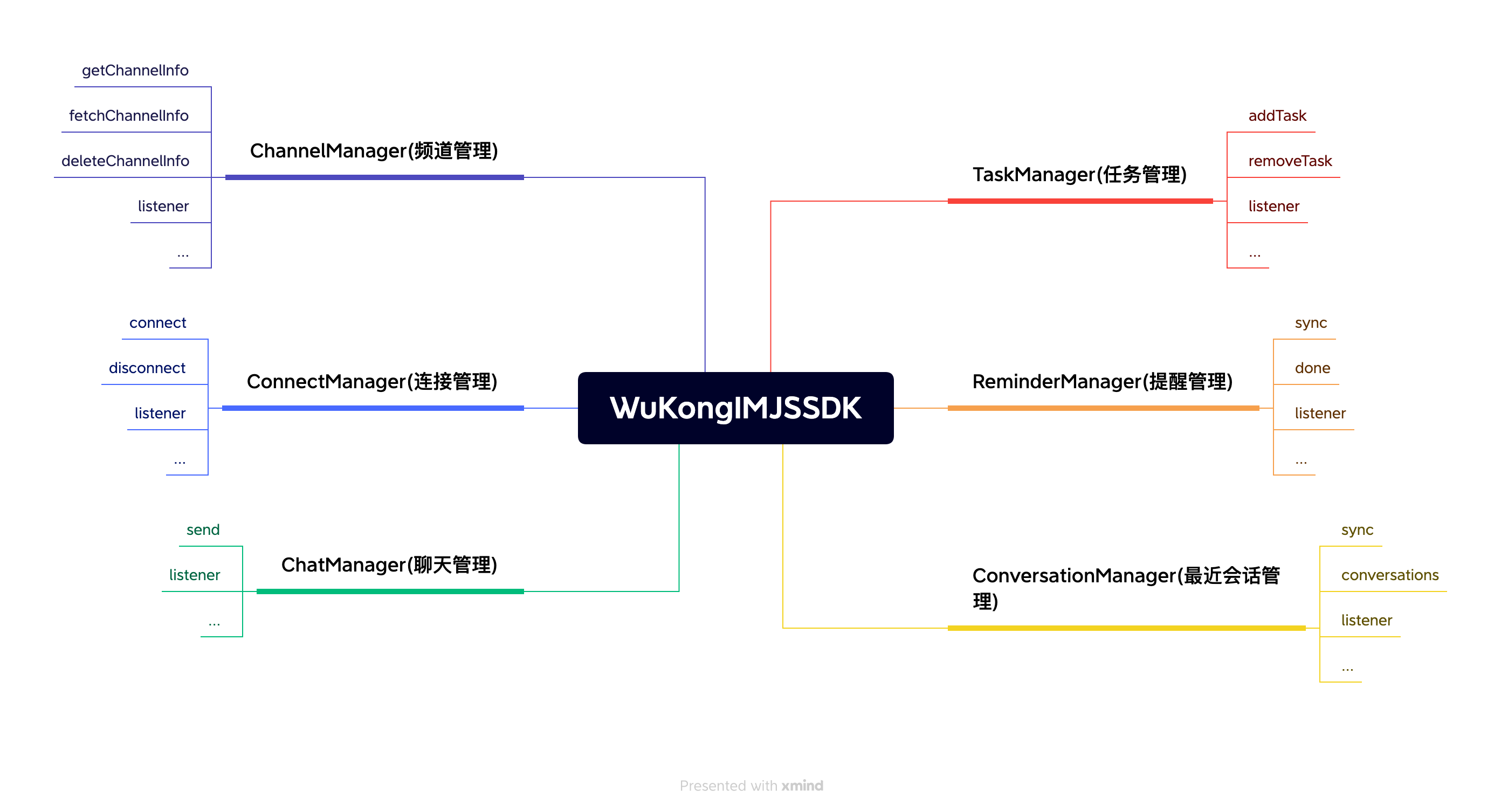 ```js theme={null}
// Chat Manager
// Responsible for message-related CRUD operations like sending messages, deleting messages,
// recalling messages, listening to chat messages, etc.
WKSDK.shared().chatManager;
// Connection Manager
// Responsible for establishing or disconnecting connections with IM,
// monitoring IM connection status, etc.
WKSDK.shared().connectionManager;
// Channel Manager
// Responsible for channel data retrieval, caching and channel settings
// like pinning, do not disturb, muting, etc.
WKSDK.shared().channelManager;
// Conversation Manager
// Responsible for maintaining recent conversation data like unread counts,
// drafts, @mentions, last messages, etc.
WKSDK.shared().conversationManager;
// Reminder Manager
// Responsible for maintaining reminder items in recent conversations
WKSDK.shared().reminderManager;
```
## Core Functionality Modules
### Chat Management (ChatManager)
* Message sending, receiving, deletion
* Message recall and editing functionality
* Chat message listening
* Historical message queries
* Message status management
### Connection Management (ConnectionManager)
* Establish WebSocket connection with IM server
* Connection disconnection and reconnection mechanism
* Connection status monitoring
* Network status handling
* Heartbeat keep-alive mechanism
### Channel Management (ChannelManager)
* Channel data retrieval and caching
* Channel settings management (pinning, do not disturb, muting, etc.)
* Channel information synchronization
* Channel member management
* Channel status monitoring
### Conversation Management (ConversationManager)
* Recent conversation data maintenance
* Unread message count statistics
* Conversation draft management
* @mention reminders
* Last message display
* Conversation sorting and filtering
### Reminder Management (ReminderManager)
* Recent conversation reminder item maintenance
* Custom reminder types
* Reminder status management
* Reminder message handling
## Platform Support
### Browser Environment
* Modern browser WebSocket support
* Local storage (localStorage/indexedDB)
* File upload and download
* Notification API support
### Node.js Environment
* Server-side WebSocket connections
* File system operations
* Database integration
* Server-side push notifications
### Framework Integration
* **React**: Provides React Hooks support
* **Vue**: Provides Vue Composition API support
* **Angular**: Provides Angular service support
* **Mini Programs**: Supports WeChat Mini Programs and other platforms
## Development Advantages
* **Unified Entry Point**: Access all functionality through `WKSDK.shared()`
* **Modular Design**: Clear separation of functional modules for easy maintenance
* **Event-Driven**: Asynchronous programming pattern based on event listening
* **Cross-Platform**: Supports both browser and Node.js environments
* **Lightweight**: Small core library size with on-demand loading
* **TypeScript Support**: Complete type definitions
* **Modern**: Supports ES6+ syntax and Promise/async-await
## Technical Features
### WebSocket Connection
* Automatic reconnection mechanism
* Connection status management
* Heartbeat detection
* Disconnection and reconnection
### Data Storage
* Browser local storage
* Message local caching
* Offline message support
* Data synchronization mechanism
### Message Processing
* Real-time message push
* Message deduplication
* Message sorting
* Message status synchronization
### File Handling
* File upload and download
* Image compression
* File type detection
* Upload progress monitoring
## Use Cases
### Web Applications
* Online customer service systems
* Social chat applications
* Collaborative office platforms
* Online education platforms
### Mobile H5
* Mobile web chat
* Hybrid app development
* PWA applications
* WeChat Official Accounts
### Server Applications
* Message push services
* Chat bots
* Data synchronization services
* API gateway integration
## Browser Compatibility
| Browser | Version | WebSocket | Local Storage | File API |
| ------- | ------- | --------- | ------------- | -------- |
| Chrome | 60+ | ✅ | ✅ | ✅ |
| Firefox | 55+ | ✅ | ✅ | ✅ |
| Safari | 11+ | ✅ | ✅ | ✅ |
| Edge | 79+ | ✅ | ✅ | ✅ |
| IE | 11 | ⚠️ | ✅ | ⚠️ |
## Installation Methods
### NPM Installation
```bash theme={null}
npm install wukongim-js-sdk
```
### CDN Integration
```html theme={null}
```
### ES6 Modules
```javascript theme={null}
import WKSDK from 'wukongim-js-sdk';
```
### CommonJS
```javascript theme={null}
const WKSDK = require('wukongim-js-sdk');
```
## Quick Start Example
```javascript theme={null}
// Initialize SDK
const sdk = WKSDK.shared();
// Configure connection
sdk.config({
addr: "ws://your-server.com:5200",
apiURL: "http://your-api-server.com",
uid: "user123",
token: "user-token"
});
// Listen for messages
sdk.chatManager.addMessageListener((message) => {
console.log('New message:', message);
});
// Connect to server
await sdk.connectionManager.connect();
// Send message
await sdk.chatManager.send({
channel_id: "friend_user_id",
channel_type: 1,
content: "Hello from JavaScript SDK!"
});
```
## Next Steps
After understanding the overall architecture of JavaScript SDK, you can:
1. [SDK Integration](/en/sdk/wukongim/javascript/integration) - Start integrating WuKongIM JavaScript SDK
2. [Basic Features](/en/sdk/wukongim/javascript/base) - Learn basic SDK configuration and usage
3. [Chat Management](/en/sdk/wukongim/javascript/chat) - Implement message sending and receiving functionality
4. [Channel Management](/en/sdk/wukongim/javascript/channel) - Manage channels and members
5. [Conversation Management](/en/sdk/wukongim/javascript/conversation) - Handle conversation lists and unread messages
```js theme={null}
// Chat Manager
// Responsible for message-related CRUD operations like sending messages, deleting messages,
// recalling messages, listening to chat messages, etc.
WKSDK.shared().chatManager;
// Connection Manager
// Responsible for establishing or disconnecting connections with IM,
// monitoring IM connection status, etc.
WKSDK.shared().connectionManager;
// Channel Manager
// Responsible for channel data retrieval, caching and channel settings
// like pinning, do not disturb, muting, etc.
WKSDK.shared().channelManager;
// Conversation Manager
// Responsible for maintaining recent conversation data like unread counts,
// drafts, @mentions, last messages, etc.
WKSDK.shared().conversationManager;
// Reminder Manager
// Responsible for maintaining reminder items in recent conversations
WKSDK.shared().reminderManager;
```
## Core Functionality Modules
### Chat Management (ChatManager)
* Message sending, receiving, deletion
* Message recall and editing functionality
* Chat message listening
* Historical message queries
* Message status management
### Connection Management (ConnectionManager)
* Establish WebSocket connection with IM server
* Connection disconnection and reconnection mechanism
* Connection status monitoring
* Network status handling
* Heartbeat keep-alive mechanism
### Channel Management (ChannelManager)
* Channel data retrieval and caching
* Channel settings management (pinning, do not disturb, muting, etc.)
* Channel information synchronization
* Channel member management
* Channel status monitoring
### Conversation Management (ConversationManager)
* Recent conversation data maintenance
* Unread message count statistics
* Conversation draft management
* @mention reminders
* Last message display
* Conversation sorting and filtering
### Reminder Management (ReminderManager)
* Recent conversation reminder item maintenance
* Custom reminder types
* Reminder status management
* Reminder message handling
## Platform Support
### Browser Environment
* Modern browser WebSocket support
* Local storage (localStorage/indexedDB)
* File upload and download
* Notification API support
### Node.js Environment
* Server-side WebSocket connections
* File system operations
* Database integration
* Server-side push notifications
### Framework Integration
* **React**: Provides React Hooks support
* **Vue**: Provides Vue Composition API support
* **Angular**: Provides Angular service support
* **Mini Programs**: Supports WeChat Mini Programs and other platforms
## Development Advantages
* **Unified Entry Point**: Access all functionality through `WKSDK.shared()`
* **Modular Design**: Clear separation of functional modules for easy maintenance
* **Event-Driven**: Asynchronous programming pattern based on event listening
* **Cross-Platform**: Supports both browser and Node.js environments
* **Lightweight**: Small core library size with on-demand loading
* **TypeScript Support**: Complete type definitions
* **Modern**: Supports ES6+ syntax and Promise/async-await
## Technical Features
### WebSocket Connection
* Automatic reconnection mechanism
* Connection status management
* Heartbeat detection
* Disconnection and reconnection
### Data Storage
* Browser local storage
* Message local caching
* Offline message support
* Data synchronization mechanism
### Message Processing
* Real-time message push
* Message deduplication
* Message sorting
* Message status synchronization
### File Handling
* File upload and download
* Image compression
* File type detection
* Upload progress monitoring
## Use Cases
### Web Applications
* Online customer service systems
* Social chat applications
* Collaborative office platforms
* Online education platforms
### Mobile H5
* Mobile web chat
* Hybrid app development
* PWA applications
* WeChat Official Accounts
### Server Applications
* Message push services
* Chat bots
* Data synchronization services
* API gateway integration
## Browser Compatibility
| Browser | Version | WebSocket | Local Storage | File API |
| ------- | ------- | --------- | ------------- | -------- |
| Chrome | 60+ | ✅ | ✅ | ✅ |
| Firefox | 55+ | ✅ | ✅ | ✅ |
| Safari | 11+ | ✅ | ✅ | ✅ |
| Edge | 79+ | ✅ | ✅ | ✅ |
| IE | 11 | ⚠️ | ✅ | ⚠️ |
## Installation Methods
### NPM Installation
```bash theme={null}
npm install wukongim-js-sdk
```
### CDN Integration
```html theme={null}
```
### ES6 Modules
```javascript theme={null}
import WKSDK from 'wukongim-js-sdk';
```
### CommonJS
```javascript theme={null}
const WKSDK = require('wukongim-js-sdk');
```
## Quick Start Example
```javascript theme={null}
// Initialize SDK
const sdk = WKSDK.shared();
// Configure connection
sdk.config({
addr: "ws://your-server.com:5200",
apiURL: "http://your-api-server.com",
uid: "user123",
token: "user-token"
});
// Listen for messages
sdk.chatManager.addMessageListener((message) => {
console.log('New message:', message);
});
// Connect to server
await sdk.connectionManager.connect();
// Send message
await sdk.chatManager.send({
channel_id: "friend_user_id",
channel_type: 1,
content: "Hello from JavaScript SDK!"
});
```
## Next Steps
After understanding the overall architecture of JavaScript SDK, you can:
1. [SDK Integration](/en/sdk/wukongim/javascript/integration) - Start integrating WuKongIM JavaScript SDK
2. [Basic Features](/en/sdk/wukongim/javascript/base) - Learn basic SDK configuration and usage
3. [Chat Management](/en/sdk/wukongim/javascript/chat) - Implement message sending and receiving functionality
4. [Channel Management](/en/sdk/wukongim/javascript/channel) - Manage channels and members
5. [Conversation Management](/en/sdk/wukongim/javascript/conversation) - Handle conversation lists and unread messages