> ## Documentation Index
> Fetch the complete documentation index at: https://wukong.mintlify.site/llms.txt
> Use this file to discover all available pages before exploring further.
# SDK Introduction
> WuKongIM iOS SDK design philosophy, architecture overview and core functionality introduction
## Design Philosophy
Like designing a book's table of contents, we design APIs through `WKSDK.shared.xxxManager` to access all needed functionality, for example sending messages `[WKSDK.shared.chatManager sendMessage:xxx]`
## Architecture Overview
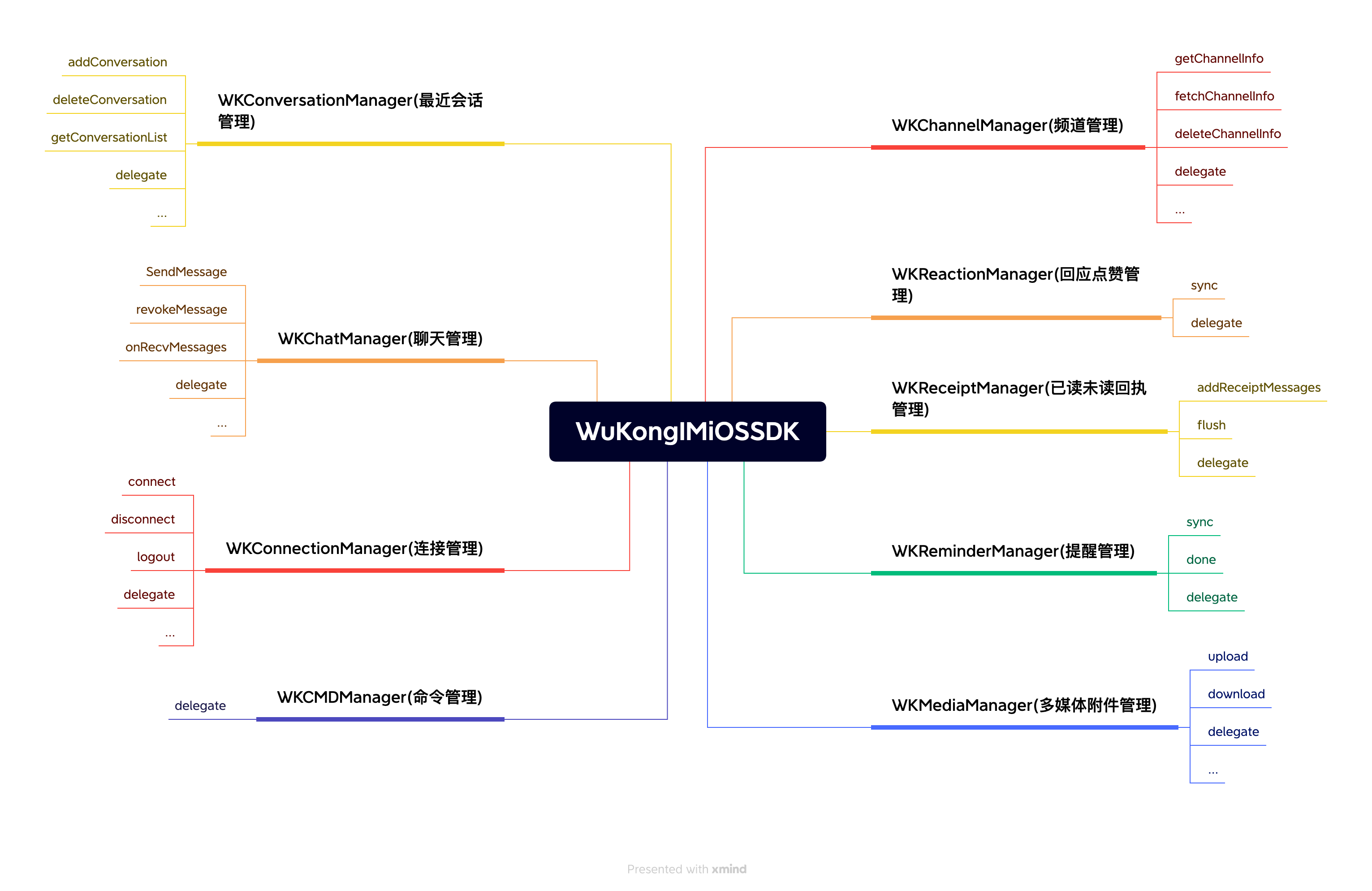 ```objc theme={null}
// Chat Manager
// Responsible for message-related CRUD operations like sending messages, deleting messages,
// recalling messages, listening to chat messages, etc.
WKSDK.shared.chatManager
// Connection Manager
// Responsible for establishing or disconnecting connections with IM,
// monitoring IM connection status, etc.
WKSDK.shared.connectionManager
// Channel Manager
// Responsible for channel data retrieval, caching and channel settings
// like pinning, do not disturb, muting, etc.
WKSDK.shared.channelManager
// Conversation Manager
// Responsible for maintaining recent conversation data like unread counts,
// drafts, @mentions, last messages, etc.
WKSDK.shared.conversationManager
// Reaction Manager
// Responsible for maintaining like/reaction data
WKSDK.shared.reactionManager
// CMD Manager
// Responsible for listening to command-type messages sent from the server
WKSDK.shared.cmdManager
// Receipt Manager
// Responsible for maintaining read/unread status of messages
WKSDK.shared.receiptManager
// Reminder Manager
// Responsible for reminder items in recent conversations like @mentions,
// group join requests, etc. Also supports custom reminders like WeChat's
// [Red Packet] [Transfer] list reminders
WKSDK.shared.reminderManager
// Media Manager
// Responsible for uploading and downloading multimedia files in messages
// like images, videos, and other messages with attachments
WKSDK.shared.mediaManager
```
## SDK Integration with Existing Apps
```objc theme={null}
// Chat Manager
// Responsible for message-related CRUD operations like sending messages, deleting messages,
// recalling messages, listening to chat messages, etc.
WKSDK.shared.chatManager
// Connection Manager
// Responsible for establishing or disconnecting connections with IM,
// monitoring IM connection status, etc.
WKSDK.shared.connectionManager
// Channel Manager
// Responsible for channel data retrieval, caching and channel settings
// like pinning, do not disturb, muting, etc.
WKSDK.shared.channelManager
// Conversation Manager
// Responsible for maintaining recent conversation data like unread counts,
// drafts, @mentions, last messages, etc.
WKSDK.shared.conversationManager
// Reaction Manager
// Responsible for maintaining like/reaction data
WKSDK.shared.reactionManager
// CMD Manager
// Responsible for listening to command-type messages sent from the server
WKSDK.shared.cmdManager
// Receipt Manager
// Responsible for maintaining read/unread status of messages
WKSDK.shared.receiptManager
// Reminder Manager
// Responsible for reminder items in recent conversations like @mentions,
// group join requests, etc. Also supports custom reminders like WeChat's
// [Red Packet] [Transfer] list reminders
WKSDK.shared.reminderManager
// Media Manager
// Responsible for uploading and downloading multimedia files in messages
// like images, videos, and other messages with attachments
WKSDK.shared.mediaManager
```
## SDK Integration with Existing Apps
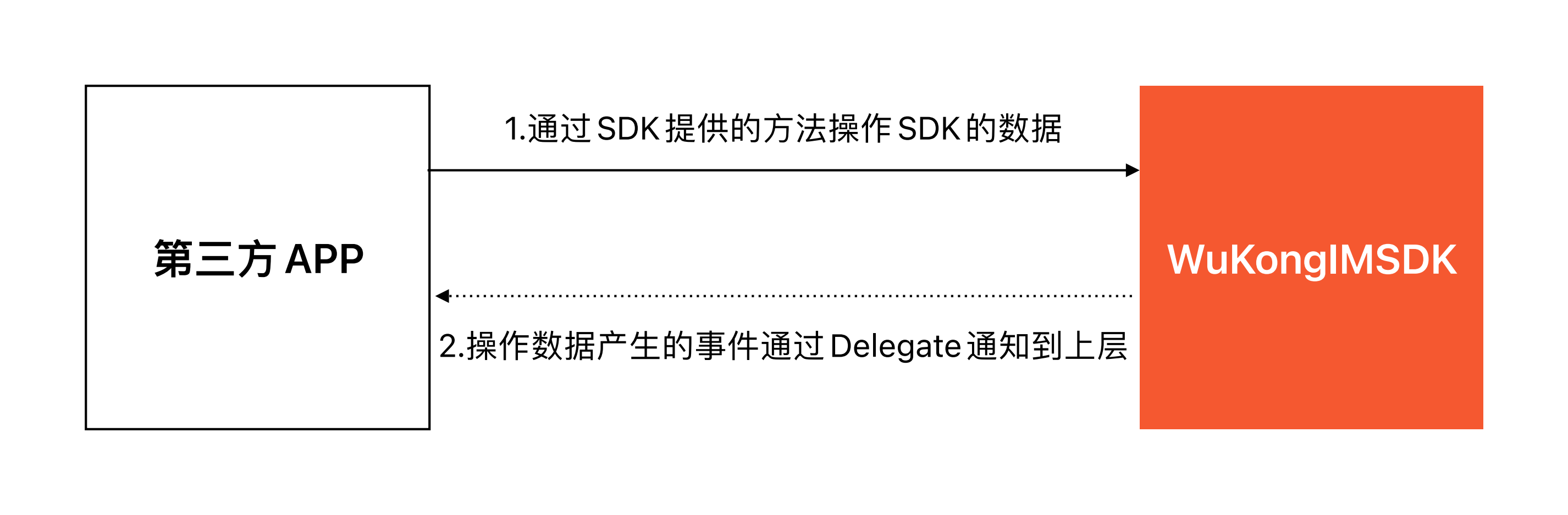 The overall flow of SDK integration with existing apps is: Existing APP calls SDK methods → Data changes occur → Notify existing APP through delegate callbacks
For example, common message sending → Message status changes → Notify existing APP to update UI send status indicators
```objc theme={null}
// Send message through chatManager
[WKSDK.shared.chatManager sendMessage:xxx]
// Listen to message status changes through chatManager's delegate
-(void) onMessageUpdate:(WKMessage*) message {
if(message.status == SUCCESS) {
[self updateItemUIWithSuccess:message];
}else {
[self updateItemUIWithFail:message];
}
}
```
## Core Functionality Modules
### Chat Management (ChatManager)
* Message sending, receiving, deletion
* Message recall and editing
* Message status monitoring
* Historical message queries
### Connection Management (ConnectionManager)
* IM connection establishment and disconnection
* Connection status monitoring
* Network status handling
* Automatic reconnection mechanism
### Channel Management (ChannelManager)
* Channel information retrieval and caching
* Channel settings (pinning, do not disturb, muting)
* Channel member management
* Channel status synchronization
### Conversation Management (ConversationManager)
* Recent conversation list maintenance
* Unread message counting
* Conversation draft management
* @mention reminders
### Media Management (MediaManager)
* Image, video, audio upload and download
* File transfer progress monitoring
* Media file cache management
* Thumbnail generation
## Development Advantages
* **Unified Entry Point**: Access all functionality through `WKSDK.shared`
* **Modular Design**: Clear separation of functional modules for easy maintenance
* **Event-Driven**: Event callbacks based on delegate pattern
* **High Performance**: Local database caching reduces network requests
* **Easy Integration**: Clean API design for quick integration into existing projects
## Next Steps
After understanding the overall architecture of iOS SDK, you can:
1. [SDK Integration](/en/sdk/wukongim/ios/integration) - Start integrating WuKongIM iOS SDK
2. [Connection Management](/en/sdk/wukongim/ios/connection) - Learn how to establish and manage connections
3. [Chat Management](/en/sdk/wukongim/ios/chat) - Implement message sending and receiving functionality
4. [Channel Management](/en/sdk/wukongim/ios/channel) - Manage channels and members
5. [Conversation Management](/en/sdk/wukongim/ios/conversation) - Handle conversation lists and unread messages
The overall flow of SDK integration with existing apps is: Existing APP calls SDK methods → Data changes occur → Notify existing APP through delegate callbacks
For example, common message sending → Message status changes → Notify existing APP to update UI send status indicators
```objc theme={null}
// Send message through chatManager
[WKSDK.shared.chatManager sendMessage:xxx]
// Listen to message status changes through chatManager's delegate
-(void) onMessageUpdate:(WKMessage*) message {
if(message.status == SUCCESS) {
[self updateItemUIWithSuccess:message];
}else {
[self updateItemUIWithFail:message];
}
}
```
## Core Functionality Modules
### Chat Management (ChatManager)
* Message sending, receiving, deletion
* Message recall and editing
* Message status monitoring
* Historical message queries
### Connection Management (ConnectionManager)
* IM connection establishment and disconnection
* Connection status monitoring
* Network status handling
* Automatic reconnection mechanism
### Channel Management (ChannelManager)
* Channel information retrieval and caching
* Channel settings (pinning, do not disturb, muting)
* Channel member management
* Channel status synchronization
### Conversation Management (ConversationManager)
* Recent conversation list maintenance
* Unread message counting
* Conversation draft management
* @mention reminders
### Media Management (MediaManager)
* Image, video, audio upload and download
* File transfer progress monitoring
* Media file cache management
* Thumbnail generation
## Development Advantages
* **Unified Entry Point**: Access all functionality through `WKSDK.shared`
* **Modular Design**: Clear separation of functional modules for easy maintenance
* **Event-Driven**: Event callbacks based on delegate pattern
* **High Performance**: Local database caching reduces network requests
* **Easy Integration**: Clean API design for quick integration into existing projects
## Next Steps
After understanding the overall architecture of iOS SDK, you can:
1. [SDK Integration](/en/sdk/wukongim/ios/integration) - Start integrating WuKongIM iOS SDK
2. [Connection Management](/en/sdk/wukongim/ios/connection) - Learn how to establish and manage connections
3. [Chat Management](/en/sdk/wukongim/ios/chat) - Implement message sending and receiving functionality
4. [Channel Management](/en/sdk/wukongim/ios/channel) - Manage channels and members
5. [Conversation Management](/en/sdk/wukongim/ios/conversation) - Handle conversation lists and unread messages