> ## Documentation Index
> Fetch the complete documentation index at: https://wukong.mintlify.site/llms.txt
> Use this file to discover all available pages before exploring further.
# Offline Messages
> Understanding WuKongIM's offline message processing mechanism and recent conversation synchronization
# Offline Messages
*WuKongIM* adopts a read-diffusion model. What are read-diffusion and write-diffusion? Reference article: [Link](https://blog.csdn.net/m0_53246313/article/details/122674197)
After enabling the recent conversation configuration, *WuKongIM* maintains a recent conversation list for each user on the server side.
1. When an application goes from offline to online, it needs to synchronize the recent conversation list, as shown in the diagram below:
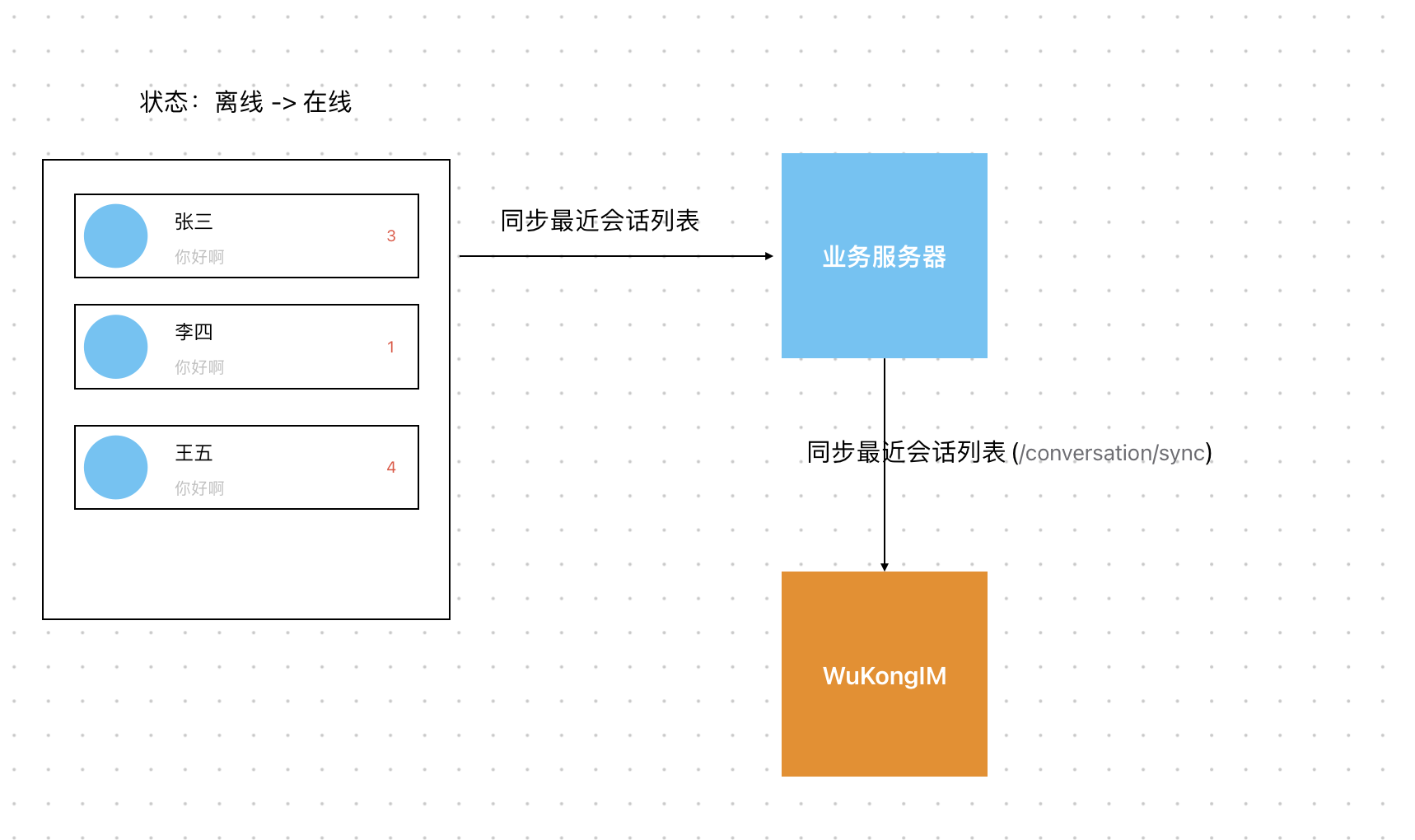 2. After the application comes online, the application should maintain the recent conversation list online.
3. When clicking on a conversation (channel) to enter the chat interface, you need to synchronize the messages of that conversation (channel), as shown in the diagram below (at the same time, you need to clear the unread count of the recent conversation using `/conversations/setUnread`):
2. After the application comes online, the application should maintain the recent conversation list online.
3. When clicking on a conversation (channel) to enter the chat interface, you need to synchronize the messages of that conversation (channel), as shown in the diagram below (at the same time, you need to clear the unread count of the recent conversation using `/conversations/setUnread`):
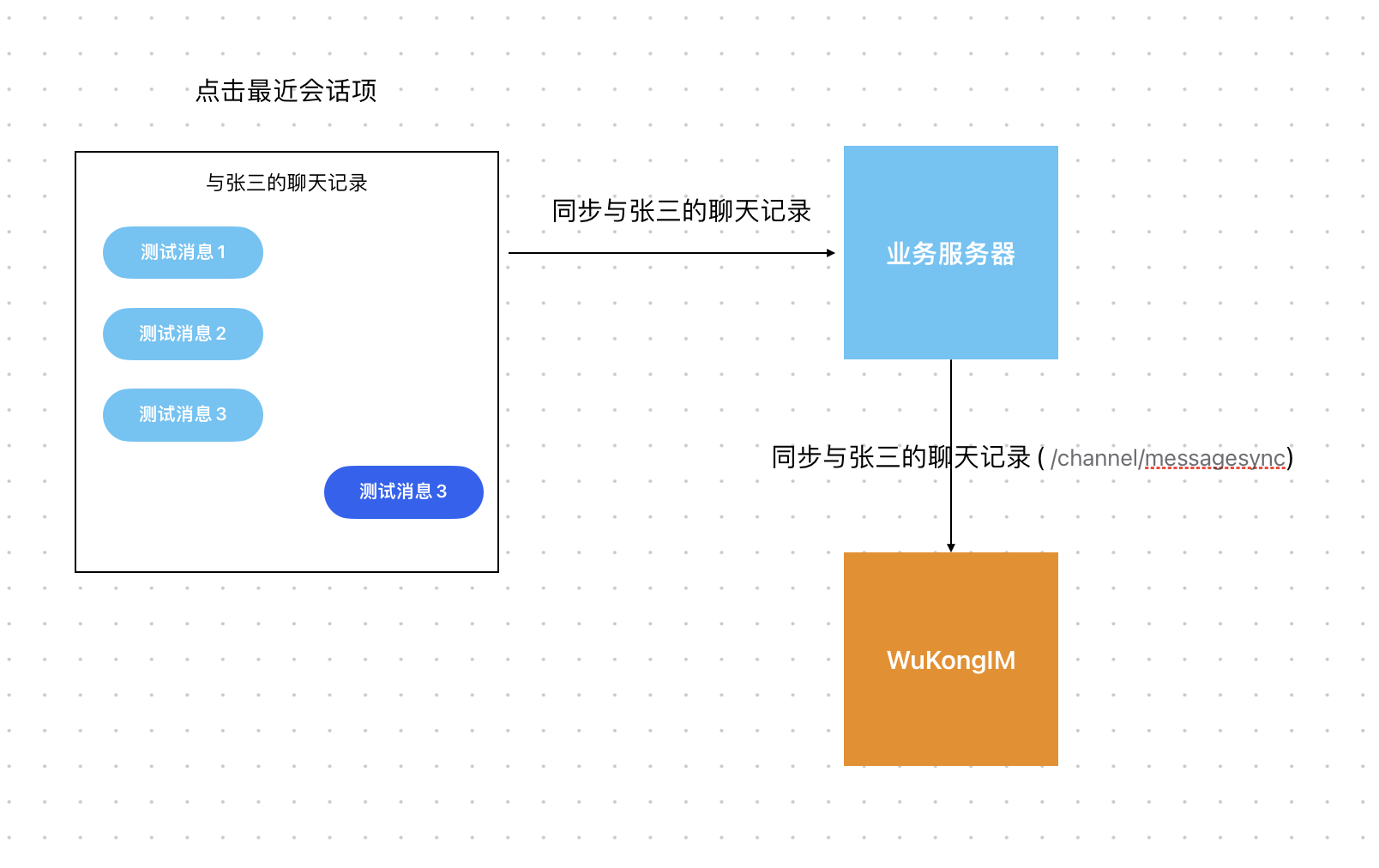 ## Offline Message Processing Flow
### 1. Application Startup Process
When your application starts up and the user comes online, follow this process:
```mermaid theme={null}
sequenceDiagram
participant App as Application
participant WK as WuKongIM Server
participant DB as Database
App->>WK: Connect to server
WK-->>App: Connection established
App->>WK: Request recent conversations
WK->>DB: Query user's conversation list
DB-->>WK: Return conversation data
WK-->>App: Send conversation list
App->>App: Update local conversation list
App->>App: Display conversations with unread counts
```
### 2. Message Synchronization Process
When entering a specific conversation:
```mermaid theme={null}
sequenceDiagram
participant App as Application
participant WK as WuKongIM Server
participant DB as Database
App->>WK: Request messages for channel
WK->>DB: Query channel messages
DB-->>WK: Return message history
WK-->>App: Send message list
App->>App: Display messages
App->>WK: Clear unread count
WK->>DB: Update conversation status
DB-->>WK: Confirm update
WK-->>App: Acknowledge unread cleared
```
## Implementation Best Practices
### 1. Conversation List Management
**Sync Recent Conversations on Startup:**
```javascript theme={null}
// Example: Sync conversations when app starts
async function syncConversationsOnStartup() {
try {
// Get recent conversations from server
const conversations = await getRecentConversations();
// Update local conversation list
updateLocalConversations(conversations);
// Update UI with unread counts
displayConversationsWithUnreadCounts(conversations);
console.log('Conversation sync completed');
} catch (error) {
console.error('Failed to sync conversations:', error);
// Handle sync failure - maybe retry or show error
}
}
// Call on app startup
window.addEventListener('load', syncConversationsOnStartup);
```
### 2. Message History Synchronization
**Load Messages When Entering Chat:**
```javascript theme={null}
// Example: Load messages when entering a conversation
async function enterConversation(channelId, channelType) {
try {
// 1. Load message history
const messages = await getChannelMessages(channelId, channelType);
// 2. Display messages in chat interface
displayMessages(messages);
// 3. Clear unread count
await clearUnreadCount(channelId, channelType);
// 4. Update conversation list UI
updateConversationUnreadCount(channelId, 0);
console.log(`Entered conversation ${channelId}`);
} catch (error) {
console.error('Failed to enter conversation:', error);
}
}
```
### 3. Real-time Updates
**Handle Real-time Message Updates:**
```javascript theme={null}
// Example: Handle incoming messages while online
function handleIncomingMessage(message) {
const { channelId, channelType } = message;
// Check if user is currently viewing this conversation
if (isCurrentlyViewingConversation(channelId, channelType)) {
// Display message immediately
displayNewMessage(message);
// Mark as read automatically
markMessageAsRead(message);
} else {
// Update conversation list with new message
updateConversationLastMessage(channelId, message);
// Increment unread count
incrementUnreadCount(channelId);
// Show notification if needed
showNotification(message);
}
}
```
## API Integration Examples
### Using WuKongIM APIs
**1. Get Recent Conversations:**
```javascript theme={null}
async function getRecentConversations() {
const response = await fetch('/conversations/sync', {
method: 'POST',
headers: { 'Content-Type': 'application/json' },
body: JSON.stringify({
uid: currentUserId,
version: lastSyncVersion || 0,
limit: 50
})
});
return await response.json();
}
```
**2. Get Channel Messages:**
```javascript theme={null}
async function getChannelMessages(channelId, channelType, limit = 20) {
const response = await fetch('/channel/messagesync', {
method: 'POST',
headers: { 'Content-Type': 'application/json' },
body: JSON.stringify({
channel_id: channelId,
channel_type: channelType,
start_message_seq: 0,
end_message_seq: 0,
limit: limit,
pull_mode: 1 // Pull down mode
})
});
return await response.json();
}
```
**3. Clear Unread Count:**
```javascript theme={null}
async function clearUnreadCount(channelId, channelType) {
const response = await fetch('/conversations/clearUnread', {
method: 'POST',
headers: { 'Content-Type': 'application/json' },
body: JSON.stringify({
uid: currentUserId,
channel_id: channelId,
channel_type: channelType
})
});
return await response.json();
}
```
## Performance Optimization
### 1. Incremental Synchronization
Use version-based incremental sync to reduce data transfer:
```javascript theme={null}
// Store last sync version locally
let lastConversationSyncVersion = localStorage.getItem('lastSyncVersion') || 0;
async function incrementalConversationSync() {
const response = await fetch('/conversations/sync', {
method: 'POST',
headers: { 'Content-Type': 'application/json' },
body: JSON.stringify({
uid: currentUserId,
version: lastConversationSyncVersion,
limit: 50
})
});
const data = await response.json();
// Update local version
if (data.version) {
lastConversationSyncVersion = data.version;
localStorage.setItem('lastSyncVersion', data.version);
}
return data;
}
```
### 2. Pagination for Large Conversations
Implement pagination for conversations with many messages:
```javascript theme={null}
async function loadMoreMessages(channelId, channelType, oldestMessageSeq) {
const response = await fetch('/channel/messagesync', {
method: 'POST',
headers: { 'Content-Type': 'application/json' },
body: JSON.stringify({
channel_id: channelId,
channel_type: channelType,
start_message_seq: 0,
end_message_seq: oldestMessageSeq - 1,
limit: 20,
pull_mode: 1
})
});
const data = await response.json();
// Prepend older messages to chat
prependMessagesToChat(data.messages);
return data;
}
```
## Error Handling
### Robust Sync Error Handling
```javascript theme={null}
async function robustConversationSync(retryCount = 3) {
for (let i = 0; i < retryCount; i++) {
try {
const conversations = await getRecentConversations();
updateLocalConversations(conversations);
return conversations;
} catch (error) {
console.error(`Sync attempt ${i + 1} failed:`, error);
if (i === retryCount - 1) {
// Last attempt failed, show error to user
showSyncError('Failed to sync conversations. Please check your connection.');
throw error;
}
// Wait before retry (exponential backoff)
await new Promise(resolve => setTimeout(resolve, Math.pow(2, i) * 1000));
}
}
}
```
## Best Practices Summary
1. **Always sync conversations on app startup** to get the latest state
2. **Use incremental sync** with version numbers to optimize performance
3. **Clear unread counts** when users view conversations
4. **Handle real-time updates** properly based on current user context
5. **Implement proper error handling** with retry mechanisms
6. **Use pagination** for large message histories
7. **Cache data locally** to improve user experience during network issues
## Offline Message Processing Flow
### 1. Application Startup Process
When your application starts up and the user comes online, follow this process:
```mermaid theme={null}
sequenceDiagram
participant App as Application
participant WK as WuKongIM Server
participant DB as Database
App->>WK: Connect to server
WK-->>App: Connection established
App->>WK: Request recent conversations
WK->>DB: Query user's conversation list
DB-->>WK: Return conversation data
WK-->>App: Send conversation list
App->>App: Update local conversation list
App->>App: Display conversations with unread counts
```
### 2. Message Synchronization Process
When entering a specific conversation:
```mermaid theme={null}
sequenceDiagram
participant App as Application
participant WK as WuKongIM Server
participant DB as Database
App->>WK: Request messages for channel
WK->>DB: Query channel messages
DB-->>WK: Return message history
WK-->>App: Send message list
App->>App: Display messages
App->>WK: Clear unread count
WK->>DB: Update conversation status
DB-->>WK: Confirm update
WK-->>App: Acknowledge unread cleared
```
## Implementation Best Practices
### 1. Conversation List Management
**Sync Recent Conversations on Startup:**
```javascript theme={null}
// Example: Sync conversations when app starts
async function syncConversationsOnStartup() {
try {
// Get recent conversations from server
const conversations = await getRecentConversations();
// Update local conversation list
updateLocalConversations(conversations);
// Update UI with unread counts
displayConversationsWithUnreadCounts(conversations);
console.log('Conversation sync completed');
} catch (error) {
console.error('Failed to sync conversations:', error);
// Handle sync failure - maybe retry or show error
}
}
// Call on app startup
window.addEventListener('load', syncConversationsOnStartup);
```
### 2. Message History Synchronization
**Load Messages When Entering Chat:**
```javascript theme={null}
// Example: Load messages when entering a conversation
async function enterConversation(channelId, channelType) {
try {
// 1. Load message history
const messages = await getChannelMessages(channelId, channelType);
// 2. Display messages in chat interface
displayMessages(messages);
// 3. Clear unread count
await clearUnreadCount(channelId, channelType);
// 4. Update conversation list UI
updateConversationUnreadCount(channelId, 0);
console.log(`Entered conversation ${channelId}`);
} catch (error) {
console.error('Failed to enter conversation:', error);
}
}
```
### 3. Real-time Updates
**Handle Real-time Message Updates:**
```javascript theme={null}
// Example: Handle incoming messages while online
function handleIncomingMessage(message) {
const { channelId, channelType } = message;
// Check if user is currently viewing this conversation
if (isCurrentlyViewingConversation(channelId, channelType)) {
// Display message immediately
displayNewMessage(message);
// Mark as read automatically
markMessageAsRead(message);
} else {
// Update conversation list with new message
updateConversationLastMessage(channelId, message);
// Increment unread count
incrementUnreadCount(channelId);
// Show notification if needed
showNotification(message);
}
}
```
## API Integration Examples
### Using WuKongIM APIs
**1. Get Recent Conversations:**
```javascript theme={null}
async function getRecentConversations() {
const response = await fetch('/conversations/sync', {
method: 'POST',
headers: { 'Content-Type': 'application/json' },
body: JSON.stringify({
uid: currentUserId,
version: lastSyncVersion || 0,
limit: 50
})
});
return await response.json();
}
```
**2. Get Channel Messages:**
```javascript theme={null}
async function getChannelMessages(channelId, channelType, limit = 20) {
const response = await fetch('/channel/messagesync', {
method: 'POST',
headers: { 'Content-Type': 'application/json' },
body: JSON.stringify({
channel_id: channelId,
channel_type: channelType,
start_message_seq: 0,
end_message_seq: 0,
limit: limit,
pull_mode: 1 // Pull down mode
})
});
return await response.json();
}
```
**3. Clear Unread Count:**
```javascript theme={null}
async function clearUnreadCount(channelId, channelType) {
const response = await fetch('/conversations/clearUnread', {
method: 'POST',
headers: { 'Content-Type': 'application/json' },
body: JSON.stringify({
uid: currentUserId,
channel_id: channelId,
channel_type: channelType
})
});
return await response.json();
}
```
## Performance Optimization
### 1. Incremental Synchronization
Use version-based incremental sync to reduce data transfer:
```javascript theme={null}
// Store last sync version locally
let lastConversationSyncVersion = localStorage.getItem('lastSyncVersion') || 0;
async function incrementalConversationSync() {
const response = await fetch('/conversations/sync', {
method: 'POST',
headers: { 'Content-Type': 'application/json' },
body: JSON.stringify({
uid: currentUserId,
version: lastConversationSyncVersion,
limit: 50
})
});
const data = await response.json();
// Update local version
if (data.version) {
lastConversationSyncVersion = data.version;
localStorage.setItem('lastSyncVersion', data.version);
}
return data;
}
```
### 2. Pagination for Large Conversations
Implement pagination for conversations with many messages:
```javascript theme={null}
async function loadMoreMessages(channelId, channelType, oldestMessageSeq) {
const response = await fetch('/channel/messagesync', {
method: 'POST',
headers: { 'Content-Type': 'application/json' },
body: JSON.stringify({
channel_id: channelId,
channel_type: channelType,
start_message_seq: 0,
end_message_seq: oldestMessageSeq - 1,
limit: 20,
pull_mode: 1
})
});
const data = await response.json();
// Prepend older messages to chat
prependMessagesToChat(data.messages);
return data;
}
```
## Error Handling
### Robust Sync Error Handling
```javascript theme={null}
async function robustConversationSync(retryCount = 3) {
for (let i = 0; i < retryCount; i++) {
try {
const conversations = await getRecentConversations();
updateLocalConversations(conversations);
return conversations;
} catch (error) {
console.error(`Sync attempt ${i + 1} failed:`, error);
if (i === retryCount - 1) {
// Last attempt failed, show error to user
showSyncError('Failed to sync conversations. Please check your connection.');
throw error;
}
// Wait before retry (exponential backoff)
await new Promise(resolve => setTimeout(resolve, Math.pow(2, i) * 1000));
}
}
}
```
## Best Practices Summary
1. **Always sync conversations on app startup** to get the latest state
2. **Use incremental sync** with version numbers to optimize performance
3. **Clear unread counts** when users view conversations
4. **Handle real-time updates** properly based on current user context
5. **Implement proper error handling** with retry mechanisms
6. **Use pagination** for large message histories
7. **Cache data locally** to improve user experience during network issues